


![shaftwhores only by [EXE]dann](/files/avatars/2007/51852-shaftwhore.gif "shaftwhores only by [EXE]dann")


Microsoft Wheel Mouse Optical 1.1a
Price: £7
Size: 125mm x 65mm x 36mm
Shape: Symmetrical
Buttons: 3
Wheel: Vertical
Sensor: Optical
Resolution: 400 DPI
USB Rate: 125 Hz
The first mouse I wanted to test was the Microsoft Wheel Mouse Optical 1.1a, a mouse I've been happily using for a long time now. It does the job you want without any fuss. This also means you can pick up a new one from as little as £7.
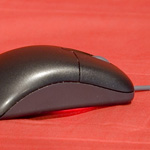
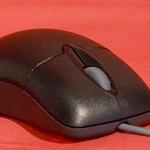
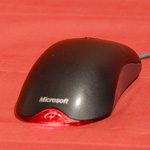

Click for larger photos
With just three buttons (including the wheel), 400 DPI and no other frills, this is a very basic mouse. The black and grey casing is made from simple, slightly textured plastic, the only flourish in the design being the glowing red tail. The shape is a symmetrical hump, characteristic of older Microsoft models.
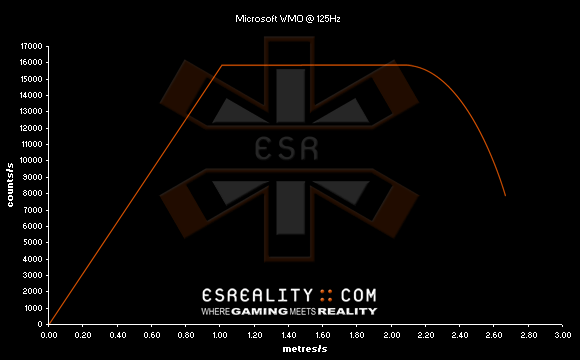
This was my very first graph plotting, so what I was expecting was a simple straight-line graph that fell off at the end as the mouse reached its skipping point. Errors were calculated using the standard deviation of results, and plotted with error bars at each point.
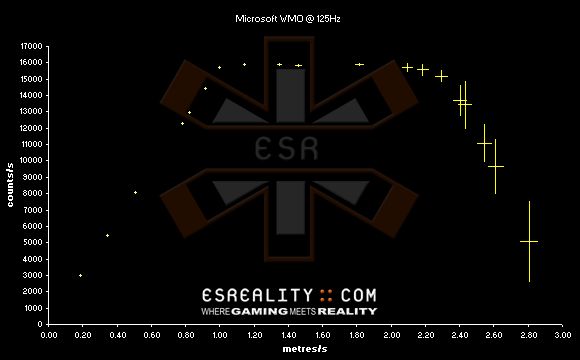
MS Wheel Mouse Optical (125 Hz) Raw Data
MS Wheel Mouse Optical (125 Hz) Response GraphRes = Resolution (in DPI)
Cts = Number of counts
Dst = Distance in inches
Res = Cts / Dst
Since the benchmark is moving at constant speed, we can say the following:
Therefore the length of time cancels out of the equation:
Since I'm working in metres per second, I'll multiply my speeds by 39.37 to convert them to inches per second.
On this graph I'll take the top end of the straight line part at 15800 cps and 1 m/s. This works out as:
If I add my error calculations into this, I get a final result of:
I wanted to track down why this mouse hits a top speed. Some simple calculations highlight the most likely factor. The USB port is polled at 125 Hz by Windows XP. If the mouse has an 8 bit buffer, then it will be reporting values from -127 to 127 on each axis each time the PC fetches a result. Therefore the highest possible value of counts per second should be 127 * 125 = 15875. This is indeed the highest value that I measured on my graph. I would conclude that the 8-bit buffer of the Microsoft mouse is the cause of this maximum speed, and the perceived negative acceleration it creates.
Since the two factors that make up the maximum speed are the buffer size and the frequency of the USB port polling, I wondered if I can improve the Microsoft WMO performance by overclocking the USB port. I set the frequency to 1000 Hz and recorded the new graph below.
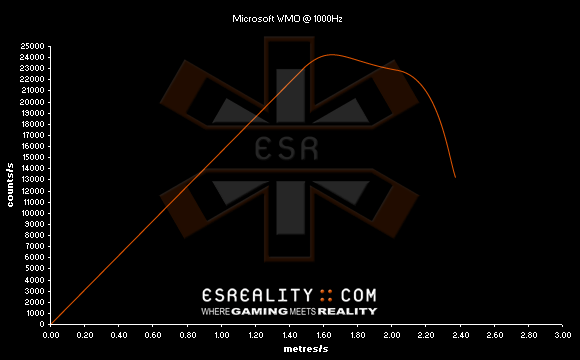
MS Wheel Mouse Optical (1000 Hz) Response Graph 1.00 m/s (40"/s) [1.55 m/s (60"/s) @ 1000Hz]
Malfunction Speed: 2.10 m/s (83"/s)
Price: £7
Size: 125mm x 65mm x 36mm
Shape: Symmetrical
Buttons: 3
Wheel: Vertical
Sensor: Optical
Resolution: 400 DPI
USB Rate: 125 Hz
The first mouse I wanted to test was the Microsoft Wheel Mouse Optical 1.1a, a mouse I've been happily using for a long time now. It does the job you want without any fuss. This also means you can pick up a new one from as little as £7.
Click for larger photos
With just three buttons (including the wheel), 400 DPI and no other frills, this is a very basic mouse. The black and grey casing is made from simple, slightly textured plastic, the only flourish in the design being the glowing red tail. The shape is a symmetrical hump, characteristic of older Microsoft models.
This was my very first graph plotting, so what I was expecting was a simple straight-line graph that fell off at the end as the mouse reached its skipping point. Errors were calculated using the standard deviation of results, and plotted with error bars at each point.
MS Wheel Mouse Optical (125 Hz) Raw Data
MS Wheel Mouse Optical (125 Hz) Response Graph
Cts = Number of counts
Dst = Distance in inches
Res = Cts / Dst
Since the benchmark is moving at constant speed, we can say the following:
Res = Resolution (in DPI)
CPS = Counts per second
Spd = Speed (in inches per second)
t = length of time measuring
Cts = CPS * t
Dst = Spd * t
Therefore the length of time cancels out of the equation:
Res = CPS / Spd
Since I'm working in metres per second, I'll multiply my speeds by 39.37 to convert them to inches per second.
Resolution (in DPI) = Counts per second / 39.37 * Speed (in m/s)
On this graph I'll take the top end of the straight line part at 15800 cps and 1 m/s. This works out as:
Resolution = 15800 / (39.37 * 1) = 401 (to 3 s.f.)
If I add my error calculations into this, I get a final result of:
Resolution = 401 ± 4 DPI
I wanted to track down why this mouse hits a top speed. Some simple calculations highlight the most likely factor. The USB port is polled at 125 Hz by Windows XP. If the mouse has an 8 bit buffer, then it will be reporting values from -127 to 127 on each axis each time the PC fetches a result. Therefore the highest possible value of counts per second should be 127 * 125 = 15875. This is indeed the highest value that I measured on my graph. I would conclude that the 8-bit buffer of the Microsoft mouse is the cause of this maximum speed, and the perceived negative acceleration it creates.
Since the two factors that make up the maximum speed are the buffer size and the frequency of the USB port polling, I wondered if I can improve the Microsoft WMO performance by overclocking the USB port. I set the frequency to 1000 Hz and recorded the new graph below.
MS Wheel Mouse Optical (1000 Hz) Response Graph
Malfunction Speed: 2.10 m/s (83"/s)