


![shaftwhores only by [EXE]dann](/files/avatars/2007/51852-shaftwhore.gif "shaftwhores only by [EXE]dann")


Design
Having decided to benchmark mice, there was several ways of going about it. The simplest method was to plot a graph of mouse response vs movement speed. Mouse response would be measured in counts per second (from Windows DirectInput) and movement speed would be measured in metres per second. DirectInput is easy to access so measuring the response of a mouse is fairly simple to do, and can be done very accurately. The tough part is measuring how fast the mouse is physically moving at the same time. After considering and discarding various options, I decided in the end to create a test setup where the mouse would be held stationary and the mousepad would be moved at a constant speed.
There are two obvious ways to move a mouse surface over the mouse sensor while keeping the mouse stationary. The first is to create a drum of the mouse surface, and spin the drum with the mouse sitting on top. There are some problems with this, particularly making sure the drum surface stays level when spinning otherwise the mouse will be bounced off.
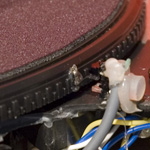
The easier option was using a turntable layout. This involved having the mouse surface on a horizontal rotating disc constantly spinning. The mouse is then placed on the surface at a fixed radius. The mouse sensor actually sees the surface moving in a straight line, even though it is actually spinning. Then it's down to measuring the radius at which the mouse sensor is placed and the speed at which the turntable is spinning to find the speed.
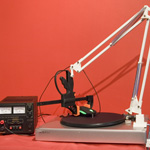
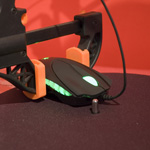
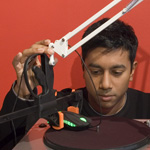
Click for larger photos
Build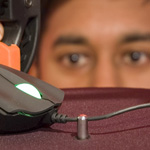
Click for larger photos
Having decided to benchmark mice, there was several ways of going about it. The simplest method was to plot a graph of mouse response vs movement speed. Mouse response would be measured in counts per second (from Windows DirectInput) and movement speed would be measured in metres per second. DirectInput is easy to access so measuring the response of a mouse is fairly simple to do, and can be done very accurately. The tough part is measuring how fast the mouse is physically moving at the same time. After considering and discarding various options, I decided in the end to create a test setup where the mouse would be held stationary and the mousepad would be moved at a constant speed.
There are two obvious ways to move a mouse surface over the mouse sensor while keeping the mouse stationary. The first is to create a drum of the mouse surface, and spin the drum with the mouse sitting on top. There are some problems with this, particularly making sure the drum surface stays level when spinning otherwise the mouse will be bounced off.
The easier option was using a turntable layout. This involved having the mouse surface on a horizontal rotating disc constantly spinning. The mouse is then placed on the surface at a fixed radius. The mouse sensor actually sees the surface moving in a straight line, even though it is actually spinning. Then it's down to measuring the radius at which the mouse sensor is placed and the speed at which the turntable is spinning to find the speed.
Click for larger photos
Build
Click for larger photos
To generate results, I took measurements over a period of 10 seconds to get accurate readings for the speed of the movement and the count produced on the computer by the mouse. The speed would be changed only after an accurate measurement was taken.