


![shaftwhores only by [EXE]dann](/files/avatars/2007/51852-shaftwhore.gif "shaftwhores only by [EXE]dann")


Optical Mice
Moving out to the serious stuff. For past several years we have witnessed a true war between Microsoft and Logitech on the optical mice market. Of course this kind of war is welcome by the customers and it results in better and better products for the end user. The optical technology had made quite a progress for the past several years and we can only wish that this kind of war continues.
The single most important thing for an optical mouse is its optical sensor. As you learned from my first article there are two components to it, the sensor DPI and the sensor FPS. The higher these numbers are, the better the mouse will behave. Most of you know that MS Intellimouse have 6000 updates per second (this is the FPS number, and it shows how many times per second the optical sensor analyzes the movement data). Previous Logitech optical mice had only 2000 FPS, and were inferior to Microsoft in this field. The new Logitech MX sensor has this information hidden in the official press release, and only thing you can find out there is that it reads 4.7 mega pixels per second. This is a new category given by the Logitech and describes how many pixels the sensor processes in a second. To get the number of updates you have to know how many pixels are processed in a single scan. To find that that you have to dig a lot more (or simply continue reading this article). Logitech MX optical sensor scans an area of 30x30 pixels per scan, and it is has 5250 of those updates per second. These two numbers multiplied give the number given by the Logitech in the press release (5250*900 = 4.7 mega pixels approximately). It almost seems like Logitech intentionally dropped this information from the press release, as it would give an impression to a lot of people that their new sensor is in fact inferior to Microsoft’s old one. But that is not the case at all, as the area scanned is much bigger than Microsoft sensor’s (or for any other optical mouse out there) and also the sensor resolution is doubled (800 DPI, compared to 400). It means that MX sensor gives a much more precise and detailed movement information than its competitor at almost the same update rate, but Microsoft still has the “fastest” mouse around.
I’ve made a little table for you, describing today’s optical mice. The T-Score value represents the number you get when you multiply DPI and FPS and is a rough estimate of optical sensor’s quality.
* - Because of the buggy Logitech drivers you are forced to use only 400 DPI
At the moment of writing this article, there is still a problem with the buggy Logitech drivers for the MX series of mice. Logitech can not seem to find an adequate software solution to “tame” this beast, which results in lots of trouble, if you are using the current drivers (only they will give you the full 800 DPI). So you are left with default windows drivers or even MS Intellimouse drivers if you want to get stable performance. That also means you will be able to use only 400 DPI out of this sensor. There is an Internet petition going on at this time, with the goal of forcing Logitech to come up with a reliable driver.
As for the review, I will not split these mice in separate pages since already so much have been told about them and you can find dozens of tests on the net already. So I am going to give you only the crucial things you need to know.
Microsoft Intellimouse series were the only real solution for pro-gaming before the Logitech MX optical sensor. With the 3.0 sensor found in today’s Explorer, Optical and Blue models you are getting what you need. 6000 FPS makes sure that the mouse doesn’t skip in all but the most extreme cases and 400 DPI is still enough for games today, considering that most of the gamers play in the resolutions up to 1024x768. Since all three mice have identical optical sensor their only difference can be found in the mouse ergonomics. Intellimouse Explorer is the largest mouse of the three.

I like to move the mouse with the wrist and not the hand, and that’s a very hard thing to do with this mouse. Because of the size it is good for games like CS where you need good tracking aim, of course under condition that you are comfortable when using it. Once you get used to it, using it will be a very enjoyable experience. No other mouse won as many CPL finals as the Explorer. Intellimouse Optical

was my personal first choice when I went optical, and that is because it is smaller and more suited for wrist control then Explorer. What I did not know at the time I bought it, is that the mouse has a problem with the height of its case. It is too high and the hand does not rest on it in a natural manner. That can and will cause you troubles and even pain when using it for longer period of time (and you know how much is long for a pro gamer). The newest Intellimouse Blue is similar to Optical in size, but with much more detail paid to ergonomics.
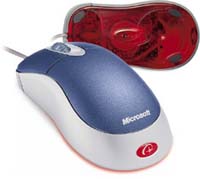
The mouse fits nicely into the hand and it’s very light and “maneuverable” - the total opposite of Intellimouse Explorer model. Definitely more suited for people who control the mouse with the wrist. It does not feature two additional buttons like its older brothers (which is not necessarily a drawback) and the mouse wheel is a bit too sensitive but not something you could not get used to.
Before the Logitech’s MX series, MouseMan Dual Optical was only Logitech’s mouse that could compete in the pro-gaming market.

It has two 800 DPI sensors (hence the name “Dual”) which allow the mouse to get precise 800 DPI information in vast variety of conditions. The mouse processor picks the data from both sensors and then chooses the one that carries more precise information at the moment. Common mistake is to misplace this to 1600 DPI resolution (2x800), as the mouse only provides with more reliable 800 DPI, nothing else. Sensor’s 2000 FPS is not enough for serious gaming, and the mouse will skip occasionally, on faster flicks. The other drawback is it’s shape, which is right-handed only and pretty bulky. You either find it comfortable or completely repulsive, there is no middle. The weight of the mouse can be adjusted via a small weight inside the mouse, which can be removed, and that is a very good idea from Logitech. This also applies to later Logitech models.
Logitech MX series brings a brand new optical sensor, current state of the art in gaming mouse field. The sensor is followed by a new design as well, which looks very elegant and sleek. Logitech MX 300 is the “flag bearer” of the series, which does not mean it is left of any important features of the more expensive models.
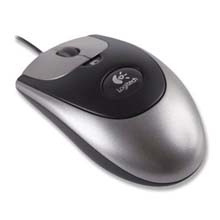
Its shape looks much alike the old Pilot+ which is a very good thing for many users that have “grown up” with the old mouse. The design is very solid and the case does not make noises when you squeeze it like Microsoft mice do. All Logitech mice have more sensitive buttons compared to Microsoft mice, which is a good thing and can be decisive in FPS duels. Just try some of the many reflex tests on a Microsoft and a Logitech mouse and you can get results that differ as much as up to 50 ms in Logitech’s favour. The buttons on this mouse are a somewhat smaller however, and I really do not see why weren’t they expanded to the full width of the mouse. As with earlier Logitech mouse you can adjust the weight of the device by removing a small weight inside the mouse. Logitech MX 500 is a more expensive model, featuring some extra size and buttons.

It has four extra buttons, compared to MX 300 model, two on either side of the wheel, and two on the side. It is more suitable for people that were used to Intellimouse Explorer before because of its size. It looks more fancy too, but there is no real difference between it and the MX 300 model.
Moving out to the serious stuff. For past several years we have witnessed a true war between Microsoft and Logitech on the optical mice market. Of course this kind of war is welcome by the customers and it results in better and better products for the end user. The optical technology had made quite a progress for the past several years and we can only wish that this kind of war continues.
The single most important thing for an optical mouse is its optical sensor. As you learned from my first article there are two components to it, the sensor DPI and the sensor FPS. The higher these numbers are, the better the mouse will behave. Most of you know that MS Intellimouse have 6000 updates per second (this is the FPS number, and it shows how many times per second the optical sensor analyzes the movement data). Previous Logitech optical mice had only 2000 FPS, and were inferior to Microsoft in this field. The new Logitech MX sensor has this information hidden in the official press release, and only thing you can find out there is that it reads 4.7 mega pixels per second. This is a new category given by the Logitech and describes how many pixels the sensor processes in a second. To get the number of updates you have to know how many pixels are processed in a single scan. To find that that you have to dig a lot more (or simply continue reading this article). Logitech MX optical sensor scans an area of 30x30 pixels per scan, and it is has 5250 of those updates per second. These two numbers multiplied give the number given by the Logitech in the press release (5250*900 = 4.7 mega pixels approximately). It almost seems like Logitech intentionally dropped this information from the press release, as it would give an impression to a lot of people that their new sensor is in fact inferior to Microsoft’s old one. But that is not the case at all, as the area scanned is much bigger than Microsoft sensor’s (or for any other optical mouse out there) and also the sensor resolution is doubled (800 DPI, compared to 400). It means that MX sensor gives a much more precise and detailed movement information than its competitor at almost the same update rate, but Microsoft still has the “fastest” mouse around.
I’ve made a little table for you, describing today’s optical mice. The T-Score value represents the number you get when you multiply DPI and FPS and is a rough estimate of optical sensor’s quality.
| Mouse | DPI | FPS | T-Score (x1000) |
| First generation optical mice | 400 | 1500 | 600 |
| MS Intellimouse Explorer 3.0 | 400 | 6000 | 2400 |
| MS Intellimouse Optical | 400 | 6000 | 2400 |
| MS Intellimouse Blue | 400 | 6000 | 2400 |
| Logitech Dual Optical | 800 | 2000 | 1600 |
| Logitech MX 300/500/700 | 800 | 5250 | 4200 |
| Logitech MX 300/500/700* | 400 | 5250 | 2100 |
* - Because of the buggy Logitech drivers you are forced to use only 400 DPI
At the moment of writing this article, there is still a problem with the buggy Logitech drivers for the MX series of mice. Logitech can not seem to find an adequate software solution to “tame” this beast, which results in lots of trouble, if you are using the current drivers (only they will give you the full 800 DPI). So you are left with default windows drivers or even MS Intellimouse drivers if you want to get stable performance. That also means you will be able to use only 400 DPI out of this sensor. There is an Internet petition going on at this time, with the goal of forcing Logitech to come up with a reliable driver.
As for the review, I will not split these mice in separate pages since already so much have been told about them and you can find dozens of tests on the net already. So I am going to give you only the crucial things you need to know.
Microsoft Intellimouse series were the only real solution for pro-gaming before the Logitech MX optical sensor. With the 3.0 sensor found in today’s Explorer, Optical and Blue models you are getting what you need. 6000 FPS makes sure that the mouse doesn’t skip in all but the most extreme cases and 400 DPI is still enough for games today, considering that most of the gamers play in the resolutions up to 1024x768. Since all three mice have identical optical sensor their only difference can be found in the mouse ergonomics. Intellimouse Explorer is the largest mouse of the three.
I like to move the mouse with the wrist and not the hand, and that’s a very hard thing to do with this mouse. Because of the size it is good for games like CS where you need good tracking aim, of course under condition that you are comfortable when using it. Once you get used to it, using it will be a very enjoyable experience. No other mouse won as many CPL finals as the Explorer. Intellimouse Optical
was my personal first choice when I went optical, and that is because it is smaller and more suited for wrist control then Explorer. What I did not know at the time I bought it, is that the mouse has a problem with the height of its case. It is too high and the hand does not rest on it in a natural manner. That can and will cause you troubles and even pain when using it for longer period of time (and you know how much is long for a pro gamer). The newest Intellimouse Blue is similar to Optical in size, but with much more detail paid to ergonomics.
The mouse fits nicely into the hand and it’s very light and “maneuverable” - the total opposite of Intellimouse Explorer model. Definitely more suited for people who control the mouse with the wrist. It does not feature two additional buttons like its older brothers (which is not necessarily a drawback) and the mouse wheel is a bit too sensitive but not something you could not get used to.
Before the Logitech’s MX series, MouseMan Dual Optical was only Logitech’s mouse that could compete in the pro-gaming market.
It has two 800 DPI sensors (hence the name “Dual”) which allow the mouse to get precise 800 DPI information in vast variety of conditions. The mouse processor picks the data from both sensors and then chooses the one that carries more precise information at the moment. Common mistake is to misplace this to 1600 DPI resolution (2x800), as the mouse only provides with more reliable 800 DPI, nothing else. Sensor’s 2000 FPS is not enough for serious gaming, and the mouse will skip occasionally, on faster flicks. The other drawback is it’s shape, which is right-handed only and pretty bulky. You either find it comfortable or completely repulsive, there is no middle. The weight of the mouse can be adjusted via a small weight inside the mouse, which can be removed, and that is a very good idea from Logitech. This also applies to later Logitech models.
Logitech MX series brings a brand new optical sensor, current state of the art in gaming mouse field. The sensor is followed by a new design as well, which looks very elegant and sleek. Logitech MX 300 is the “flag bearer” of the series, which does not mean it is left of any important features of the more expensive models.
Its shape looks much alike the old Pilot+ which is a very good thing for many users that have “grown up” with the old mouse. The design is very solid and the case does not make noises when you squeeze it like Microsoft mice do. All Logitech mice have more sensitive buttons compared to Microsoft mice, which is a good thing and can be decisive in FPS duels. Just try some of the many reflex tests on a Microsoft and a Logitech mouse and you can get results that differ as much as up to 50 ms in Logitech’s favour. The buttons on this mouse are a somewhat smaller however, and I really do not see why weren’t they expanded to the full width of the mouse. As with earlier Logitech mouse you can adjust the weight of the device by removing a small weight inside the mouse. Logitech MX 500 is a more expensive model, featuring some extra size and buttons.
It has four extra buttons, compared to MX 300 model, two on either side of the wheel, and two on the side. It is more suitable for people that were used to Intellimouse Explorer before because of its size. It looks more fancy too, but there is no real difference between it and the MX 300 model.