ESReality - Where Gaming Meets Reality
Site
Text
Media
Games
About
|
Contact
|
Guide
|
Filters
Users
|
Preferences
|
Search
|
FAQ
News
|
Forums
|
Columns
Journals
|
Articles
|
Polls
|
Wiki
Files
|
Galleries
|
Demos
Events
|
Coverage
|
Movies
ESR Shop
|
Betting Fixtures
Not Logged In
|
Login
|
Register
19:32 UTC -
219 users online
ESR Discord Channel
Live Streams
LoL
Riot Games
(41123 viewers)
GG
Bob Ross
(701 viewers)
CS
ESL CS:GO
(334 viewers)
QC
BASE_TV
(220 viewers)
QC
k1llsen
(211 viewers)
QC
ShaftasticTV
(122 viewers)
GG
White-Ra
(99 viewers)
SC2
ESL SC2
(51 viewers)
and 5 more
Scheduled Listings
more...
Other QL threads
Facebook Quake group with 16k users
(0)
Hell just froze
(6)
old Av3k clip i stumbled on
(6)
Nobody
(11)
ql_quake_tv twitch channel is a gem
(6)
Cypher saying ?That game is easy? playin...
(5)
How to get my old settings back?
(2)
How to watch Quake Live demos in VR (wol...
(7)
CPMA Fullbright Skins
(1)
Online Quake Live Config Editor app
(17)
more...
Latest Threads
Latest Comments
News
QuakeWorld one-day 2v2 cup set for Octob...
(1)
News
Church of Quake hosts Sacrifice cup on O...
(0)
News
k1llsen wins fifth EGB QC duel title at ...
(0)
News
Frontier opens Quake Live one-map cup fo...
(0)
News
Steam improves startup and adds Big Pict...
(0)
more...
Latest Forum Threads
GG
[Looking beta testers] Dinoblast — defr...
(4)
GG
LG Train - lightning gun tracking traine...
(0)
Q3
Quake3e #3
(0)
GG
Visit to Tokyo japan
(9)
CS
1.6 Competitive 5V5 Matchmaking + FFA
(0)
more...
Latest Journals
Ai Bot
(2) by cloned
we meat again
(1177) by aggnog
QuakeChampions FPS
(15) by WedbulL
500.
(32) by pizz
journal and photos
(41) by tom
more...
Hot Topics
Journal
Ai Bot
(2)
News
QuakeWorld one-day 2v2 cup set for Octob...
(1)
News
Squadron 42 opens Steam wishlists for Q2...
(1)
Forum
Quake3e #3
(0)
News
Church of Quake hosts Sacrifice cup on O...
(0)
more...
ESR Virtual Betting
Lamur
E$ 238,131
E$ 176,304
omek
E$ 129,238
fazz
E$ 61,723
lithz
E$ 58,635
nsx0r
E$ 57,658
nk121
Betting Leaderboard
Open Betting Fixtures
New QL thread
Forums
>
Quake Live Forum
Red damage indicator on hit fix
(
10 comments
)
( Forum: QL)
Posted by
Grota
@ 16:16 UTC, 27 October 2015 -
iMsg
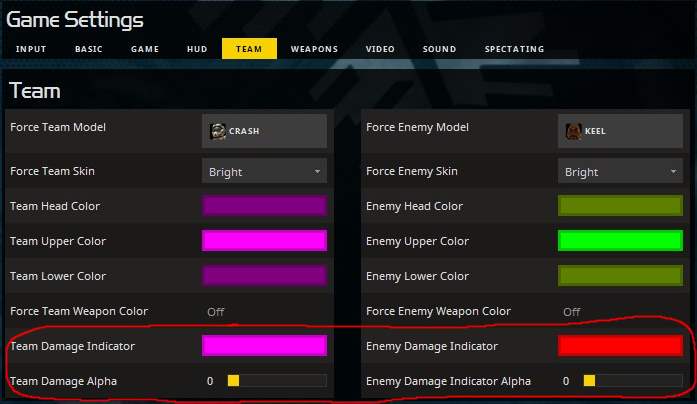
for those of you who wonder, to fix the annoying red damage indicator when you get hit, its in the menu > team > enemy damage indicator alpha > 0
14918 Hits
19%
<< prev QL thread
||
next QL thread >>
<<
Comment #1 @ 17:21 UTC, 27 October 2015
>>
(
Link
,
Reply
)
By
Yakumo
All you can do to turn it off in the menu is the equivalent of :
cg_screenDamageAlpha_Team 0
cg_screenDamageAlpha 0
edit, you shouldn't need to set the following, but if the above doesn't work:
cg_ScreenDamage
cg_screenDamage_Self
cg_ScreenDamage_Team
are hex settings, 0xRRGGBBAA, though I don't get why they did that as the last 2 digits have always been alpha, and have separate alpha cvars too :/
use 0x00000000 for them
Edited by Yakumo at 20:57 UTC, 28 October 2015
11%
<<
Comment #6 @ 21:56 UTC, 28 October 2015
>>
(
Link
,
Reply
)
By
mickzerofive
- Reply to
#1
thanks Yakumo, this was bothering me
<<
Comment #2 @ 18:09 UTC, 27 October 2015
>>
(
Link
,
Reply
)
By
Anonymous (178.148.186.18)
my monitor flashing when someone hiting me with lg,is that normal now or i can disable that?
<<
Comment #3 @ 20:03 UTC, 27 October 2015
>>
(
Link
,
Reply
)
By
Yakumo
- Reply to
#2
see post #1
<<
Comment #4 @ 21:44 UTC, 27 October 2015
>>
(
Link
,
Reply
)
By
Anonymous (194.150.168.95)
the menu and everything else were quiet acceptable before the update. enough reason to change it, innit? fkin INNIT you dullwheats id?!?!
i will not play this game for a while until one rainy sunday afternoon in the far future.
<<
Comment #5 @ 22:43 UTC, 27 October 2015
>>
(
Link
,
Reply
)
By
Yakumo
- Reply to
#4
Here's one reason right off the bat, none of the options could be individually reset to default before, now they all can.
Edited by Yakumo at 22:44 UTC, 27 October 2015
7%
<<
Comment #7 @ 09:04 UTC, 29 February 2016
>>
(
Link
,
Reply
)
By
GanGBanG
bump!
finally found cg_screenDamageAlpha 0, and that annoying flash when i get hit is now gone. makes is so much better for LG vs LG battles.
petitioning syncerror to have this off as standard, and an option in the UI, instead of having to dig through forum posts.
Edited by GanGBanG at 09:05 UTC, 29 February 2016
<<
Comment #8 @ 14:10 UTC, 29 February 2016
>>
(
Link
,
Reply
)
By
Yakumo
- Reply to
#7
The option IS in the UI and always has been.
Edited by Yakumo at 14:18 UTC, 29 February 2016
<<
Comment #9 @ 16:46 UTC, 29 February 2016
>>
(
Link
,
Reply
)
By
Gobotz
- Reply to
#8
I don't see it.
<<
Comment #10 @ 16:47 UTC, 29 February 2016
>>
(
Link
,
Reply
)
By
Gobotz
How do i turn off enemy names over x-hair? I turned it off in the menu but it doesn't actually turn it off.
Homepage
Reply to:
[
Reset
]
Format:
BB style
Markdown
Formatting:
Content:
Are you a bot?
Or if you already have an account:
Username:
Password:
Read the Posting Guidelines
Non-HTML tags: [b]
bold
[/b], [i]
italics
[/i], [u]
underlined
[/u]
[small]
small
[/small], [q]quoted[/q], [s]
strikethrough
[/s]
[url=www.url.com]
link
[/url] or type
www.url.com
[flag=country] (
list
), [avatar=name] (
list
)
[map=mapname gamename] (
list
)
Conceived and created by
Sujoy Roy
(
Legal Notices
)
RSS Feed Information
,
Link Buttons and Banners


![shaftwhores only by [EXE]dann](/files/avatars/2007/51852-shaftwhore.gif "shaftwhores only by [EXE]dann")